03 - Driver Control
Introduction
In this tutorial, we will be learning how to program the drivetrain to allow for controller joystick inputs.
The controller
The controller has 2 joysticks. A left one and a right one. Each joystick has 2 axes, an x axis and a y axis. We will be using these axes to control the drivetrain.
Tank Drive
Tank drive is a simple method of controlling the drivetrain. You give it the power for the left wheels and the power for the right wheels. In this example, we will use the left y axis and the right y axis.
pros::Controller controller();

void opcontrol() {
    // loop forever
    while (true) {
        // get left y and right y positions
        int leftY = controller.get_analog(pros::E_CONTROLLER_ANALOG_LEFT_Y);
        int rightY = controller.get_analog(pros::E_CONTROLLER_ANALOG_RIGHT_Y);

        // move the robot
        chassis.tank(leftY, rightY);

        // delay to save resources
        pros::delay(10);
    }
}
Arcade Drive
Arcade drive is the most popular form of controlling the robot. In arcade control, we give the robot a forwards/backwards speed and a turning speed. Below are 2 examples: single stick arcade and double stick arcade.
Single Stick Arcade
pros::Controller controller();

void opcontrol() {
    // loop forever
    while (true) {
        // get left y and right x positions
        int leftY = controller.get_analog(pros::E_CONTROLLER_ANALOG_LEFT_Y);
        int leftX = controller.get_analog(pros::E_CONTROLLER_ANALOG_LEFT_X);

        // move the robot
        chassis.arcade(leftY, leftX);

        // delay to save resources
        pros::delay(10);
    }
}
Double Stick Arcade
pros::Controller controller();

void opcontrol() {
    // loop forever
    while (true) {
        // get left y and right x positions
        int leftY = controller.get_analog(pros::E_CONTROLLER_ANALOG_LEFT_Y);
        int rightX = controller.get_analog(pros::E_CONTROLLER_ANALOG_RIGHT_X);

        // move the robot
        chassis.arcade(leftY, rightX);

        // delay to save resources
        pros::delay(10);
    }
}
Curvature Drive
Curvature drive is a lesser-know, yet powerful, method. We give the robot a forwards/backwards speed, and the curvature of an arc. The greater the curvature, the more the robot turns. Its similar to arcade but performs better when turning. Below is an example of single stick and double stick curvature drive:
Single Stick Curvature
pros::Controller controller();

void opcontrol() {
    // loop forever
    while (true) {
        // get left y and right x positions
        int leftY = controller.get_analog(pros::E_CONTROLLER_ANALOG_LEFT_Y);
        int leftX = controller.get_analog(pros::E_CONTROLLER_ANALOG_LEFT_X);

        // move the robot
        chassis.curvature(leftY, leftX);

        // delay to save resources
        pros::delay(10);
    }
}
Double Stick Curvature
pros::Controller controller();

void opcontrol() {
    // loop forever
    while (true) {
        // get left y and right x positions
        int leftY = controller.get_analog(pros::E_CONTROLLER_ANALOG_LEFT_Y);
        int rightX = controller.get_analog(pros::E_CONTROLLER_ANALOG_RIGHT_X);

        // move the robot
        chassis.curvature(leftY, rightX);

        // delay to save resources
        pros::delay(10);
    }
}
But which do I choose?
There is no right answer to this question. The driver should use whichever control method they feel most comfortable with.
Input Scaling
Making precise movements is difficult. If only there was a way make it less sensitive, but not limit the maximum speed. Well, there is a way, and it’s called input scaling.
Instead of the regular linear relationship between controller input and drivetrain output, input scaling is an exponential relationship to make small movements less sensitive in exchange for making fast movements less sensitive. Below in an image of this relationship:
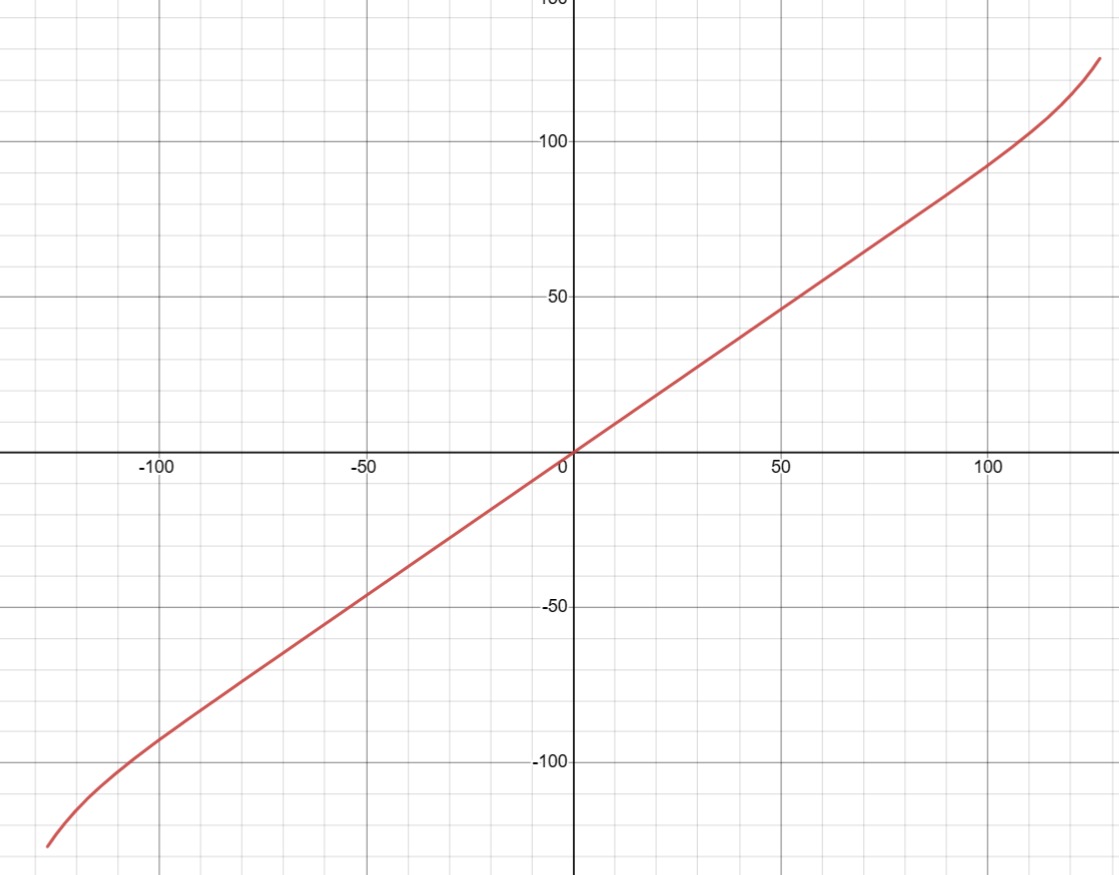
Here is a Desmos graph which shows this relationship. You can tune t to make it as steep as you like. Once we have this t value, we can input it into the drive functions:
pros::Controller controller();

void opcontrol() {
    // loop forever
    while (true) {
        // get left y and right x positions
        int leftY = controller.get_analog(pros::E_CONTROLLER_ANALOG_LEFT_Y);
        int rightX = controller.get_analog(pros::E_CONTROLLER_ANALOG_RIGHT_X);

        // move the robot. T value is 12.4
        chassis.curvature(leftY, rightX, 12.4);

        // delay to save resources
        pros::delay(10);
    }
}
Conclusion
That’s all for driver control. We will be covering autonomous motion and tuning in the next tutorial.